



Hi, I’m Ahad Raza
a
Data Analyst
Power BI Specialist
SQL Specialist
As a self-motivated and detail-oriented Data Analyst, I am building my career driven by a strong passion for transforming data into meaningful insights that support effective decision-making and business growth. With solid skills in Excel, SQL, Power BI, and Python, I have developed a strong foundation in data analysis, reporting, and visualization, enabling me to convert raw data into clear, actionable information. I continuously strive to strengthen my expertise in analytics, data modeling, and business intelligence through ongoing learning and practical experience. With a data-driven mindset, analytical thinking, and commitment to excellence, I aspire to contribute to dynamic, results-oriented environments by delivering impactful insights and innovative, real-world data solutions.
What I Do
Data Analyst
I possess strong skills in data analysis, including the ability to collect, analyze, and interpret large datasets to extract actionable insights. My expertise extends to statistical techniques and programming languages such as SQL and Python, enabling me to conduct thorough analyses and derive meaningful conclusions. Additionally, I am proficient in utilizing data visualization tools to present findings in a clear and concise manner, facilitating effective communication of insights to stakeholders.
Business Intelligence
With experience as a Business Intelligence Specialist, I have honed my ability to transform raw data into valuable insights that drive strategic decision-making within organizations. My proficiency lies in data modeling, reporting, and dashboard creation, allowing me to provide comprehensive business insights to stakeholders at all levels. I am adept at leveraging various tools and technologies to ensure the delivery of actionable insights that contribute to organizational success.
Power BI Specialist
As a Power BI Specialist, I excel in utilizing Microsoft Power BI for data visualization and analysis purposes. My skills include designing interactive dashboards, creating robust data models, and performing advanced analytics to empower users with intuitive reports and visualizations. By leveraging Power BI, I facilitate informed decision-making processes across the organization, enabling stakeholders to gain valuable insights into business performance and trends.
My Portfolio
The Situation:
Adventure Works is a fictional global manufacturing company that produces cycling equipment and accessories, with activities stretching across three continents (North America, Europe, and Oceania). Our goal is to transform their raw data into meaningful insights and recommendations for management. More specifically, we need to:
- Track KPIs (sales, revenue, profit, returns)
- Compare regional performance
- Analyse product-level trends
- Identify high-value customers
The Data:
We’ve been given a collection of raw data (CSV files), which contain information about transactions, returns, products, customers, and sales territories in a total of eight tables, spanning from the years 2020 to 2022.
The Task: We are tasked with using solely Microsoft Power BI to:
- Connect and transform/shape the data in Power BI’s back-end using Power Query
- Build a relational data model, linking the 8 fact and dimension tables
- Create calculated columns and measures with DAX
- Design a multi-page interactive dashboard to visualize the data in Power BI’s front-end
The Process:
1. Connecting and Shaping the Data
Firstly, we imported the data into the Power Query editor to transform and clean it. The next process involved:
Removing Duplicates: Duplicate entries were removed from the dataset to ensure accurate analysis.
Handling Null or Missing Values: For some columns, missing values were replaced with defaults or averages. Null values in “key” columns were removed using filters.
Data Type Conversion: Columns were converted to appropriate data types to ensure consistency. Dates were converted to Date type, numerical columns to Decimal or Whole Numbers, and text columns to Text.
Column Splitting and Merging: Several columns were split to separate concatenated information, or merged to create a unified name (such as Customer Full Name).
Standardising Date Formats: All date columns were formatted consistently to facilitate time-based analysis. This step was important for ensuring accurate time-series analysis in Power BI.
Removing Unnecessary Columns: Irrelevant columns were removed to streamline the dataset. This helped focus the analysis on relevant information, reducing memory usage and improving performance.
2. Building a Relational Data Model
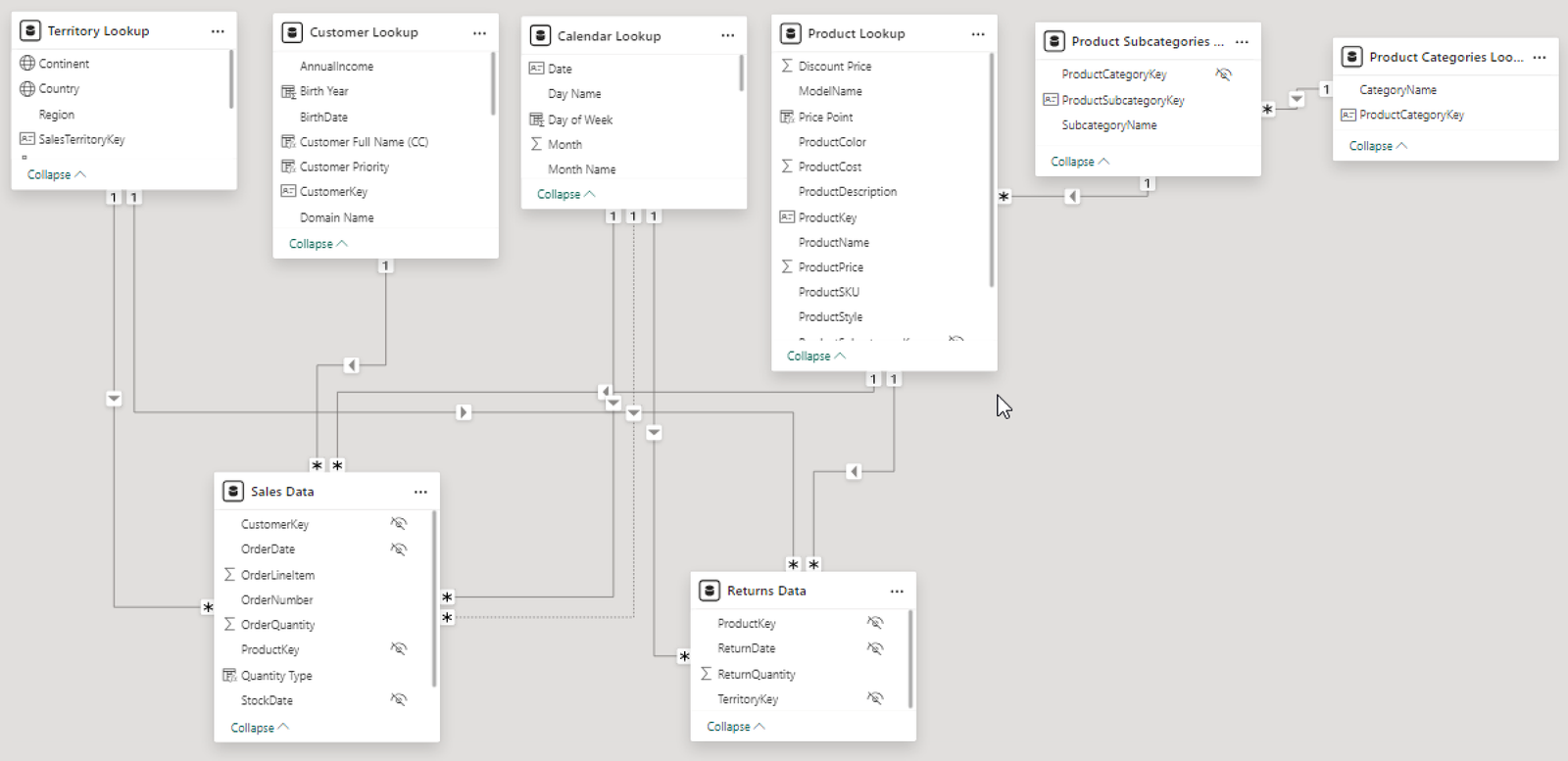
Secondly, we modeled the data to create a snowflake schema. This process involved creating relationships between the dimension and fact tables, ensuring cardinalities were one-to-many relationships.
Enabling active or inactive relationships, creating hierarchies for fields such as Geography (Continent-Country-Region) and Date (Start of Year-Start of Month-Start of Week-Date), and finally hiding the foreign keys from report view to ease the data analysis and visualization steps and reduce errors.

3. Creating Calculated Columns and Measures
Next, we used Power BI’s front-end formula language, DAX, to analyze our relational data model and create several calculated columns (for filtering) and measures (for aggregation), that we could later reference and use when analyzing and visualizing the data.
We used calculated columns to determine whether a customer is a parent (Yes/No), a customer’s income level (Very High/High/Average/Low), a customer’s priority status (Priority/ Standard), and the customer’s educational level (High School/ Undergrad/ Graduate).
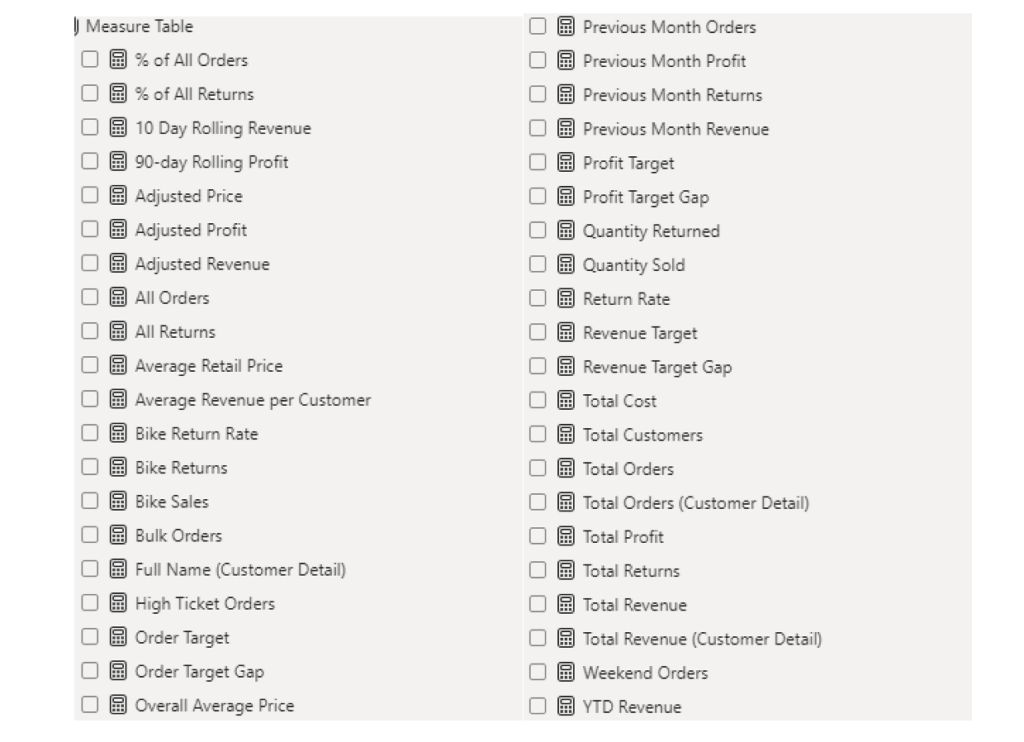
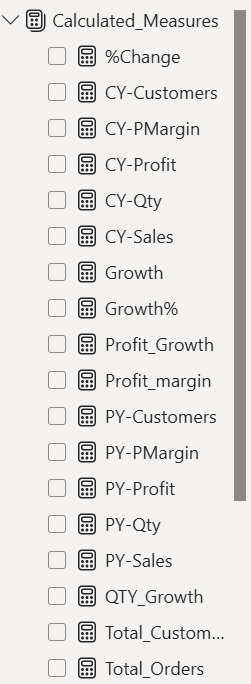
The list of calculated measures is available below and includes key information on revenue, profit, orders, returns, and more.

4. Visualising the Data
The final step of the project was creating a multi-page interactive dashboard, including a range of visuals and KPIs that could serve management and lead to informed decision-making. We used several visuals and tools to demonstrate and visualize the data across the 4 report pages, including KPI cards, line and bar charts, matrices, gauge charts, maps, donut charts, and slicers. We made sure the report was fully interactive and simple to navigate, with icons used to enable filters, cancel filters, and guide users to each report page with ease. Features such as drill-through, bookmarks, parameters, and tooltips were also used throughout the dashboard, further enhancing its usefulness and impact on management.
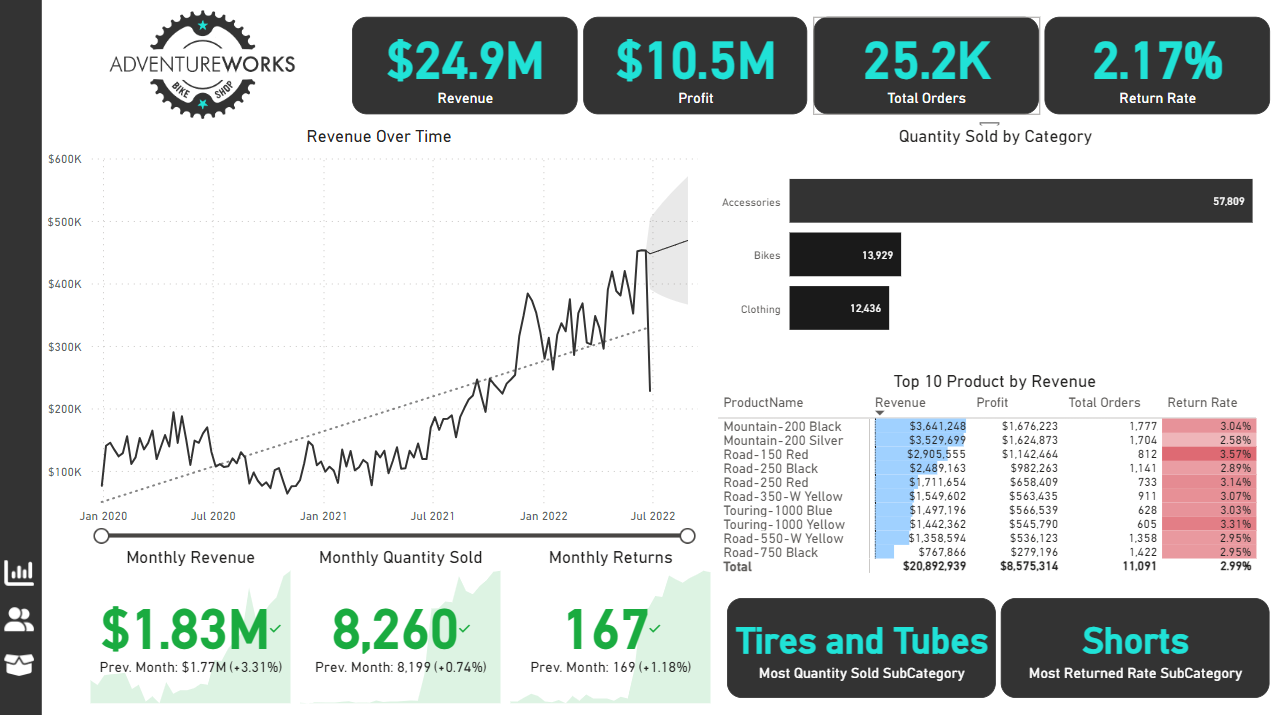
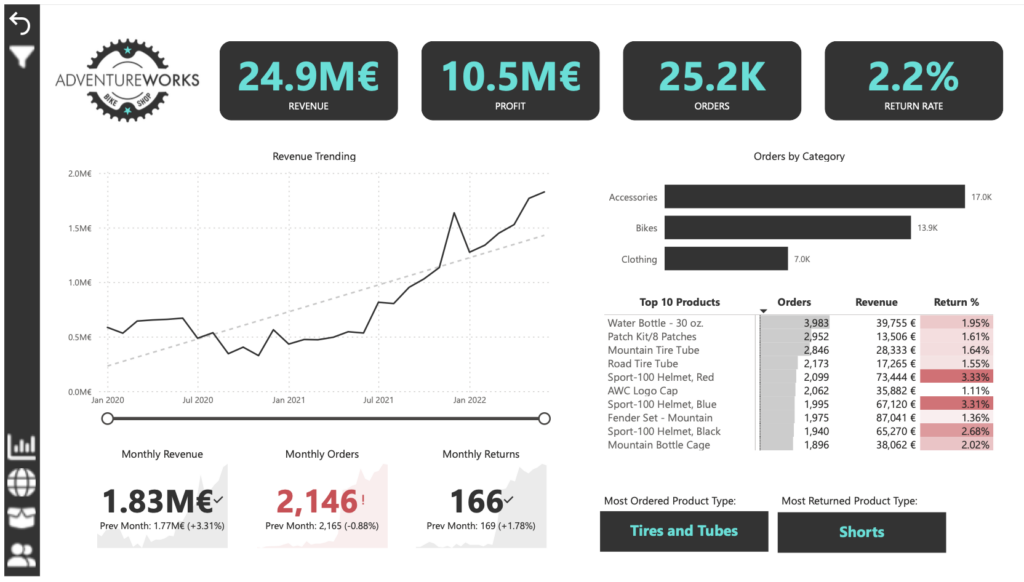
Executive Dashboard: The first report page provides a high-level view of Adventure Works’ overall performance. We used card visuals to present Key Performance Indicators such as overall revenue, profit margins, total orders, and return rates. We also included additional cards to compare current and previous month performances, providing insights into recent trends, a line chart to visualize the trending revenue from 2020-2022 and highlight long-term performance, and presented the number of orders by product category to aid in understanding product sales distribution, and used a further table to display the top 10 products based on key indicators (total orders, revenue, and return rate).

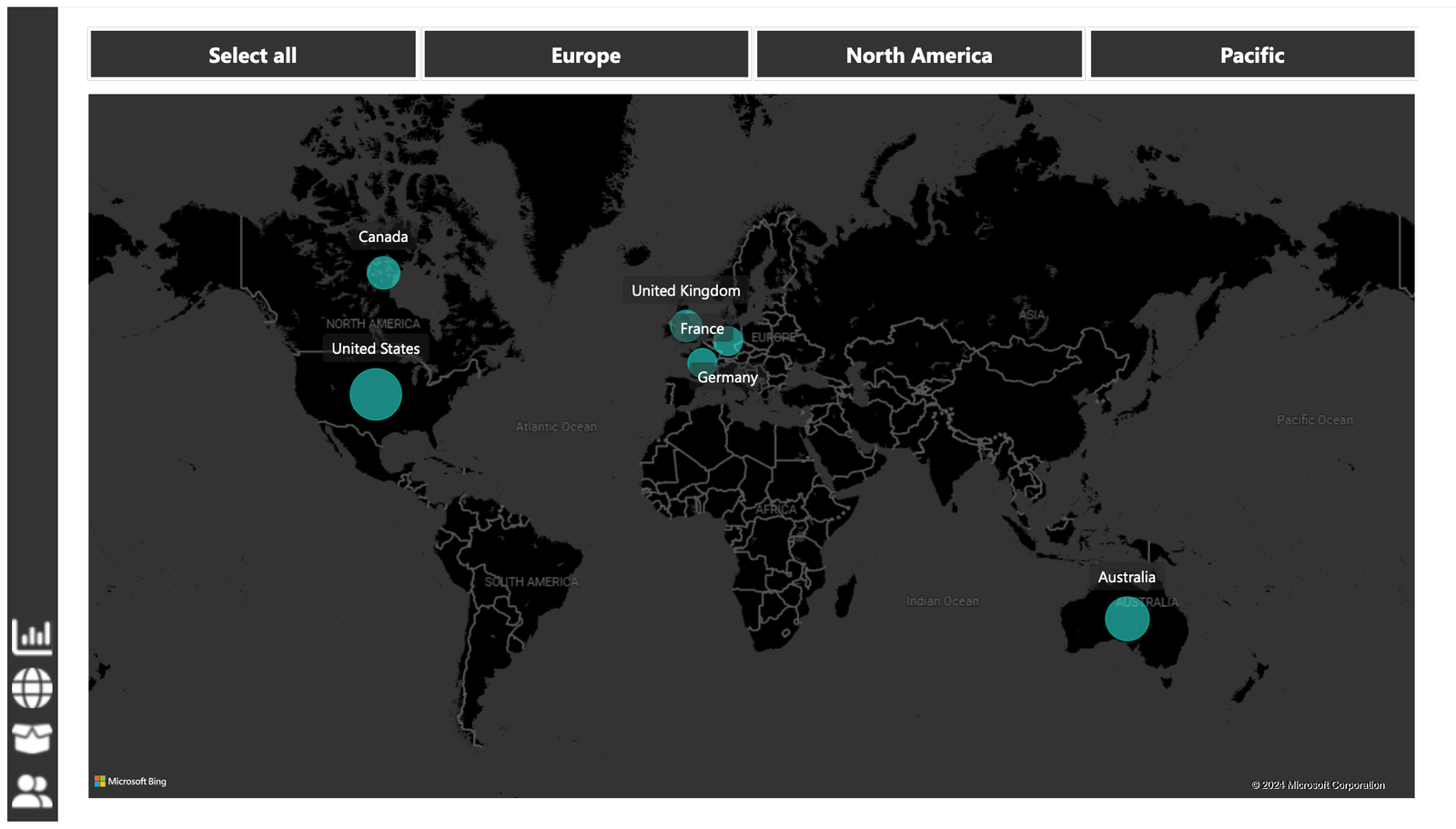
Map: The second report page consisted of a map visual, an interactive representation of sales volume across different geographical locations. This offered insight into Adventure Works’ global sales distribution and worldwide reach.

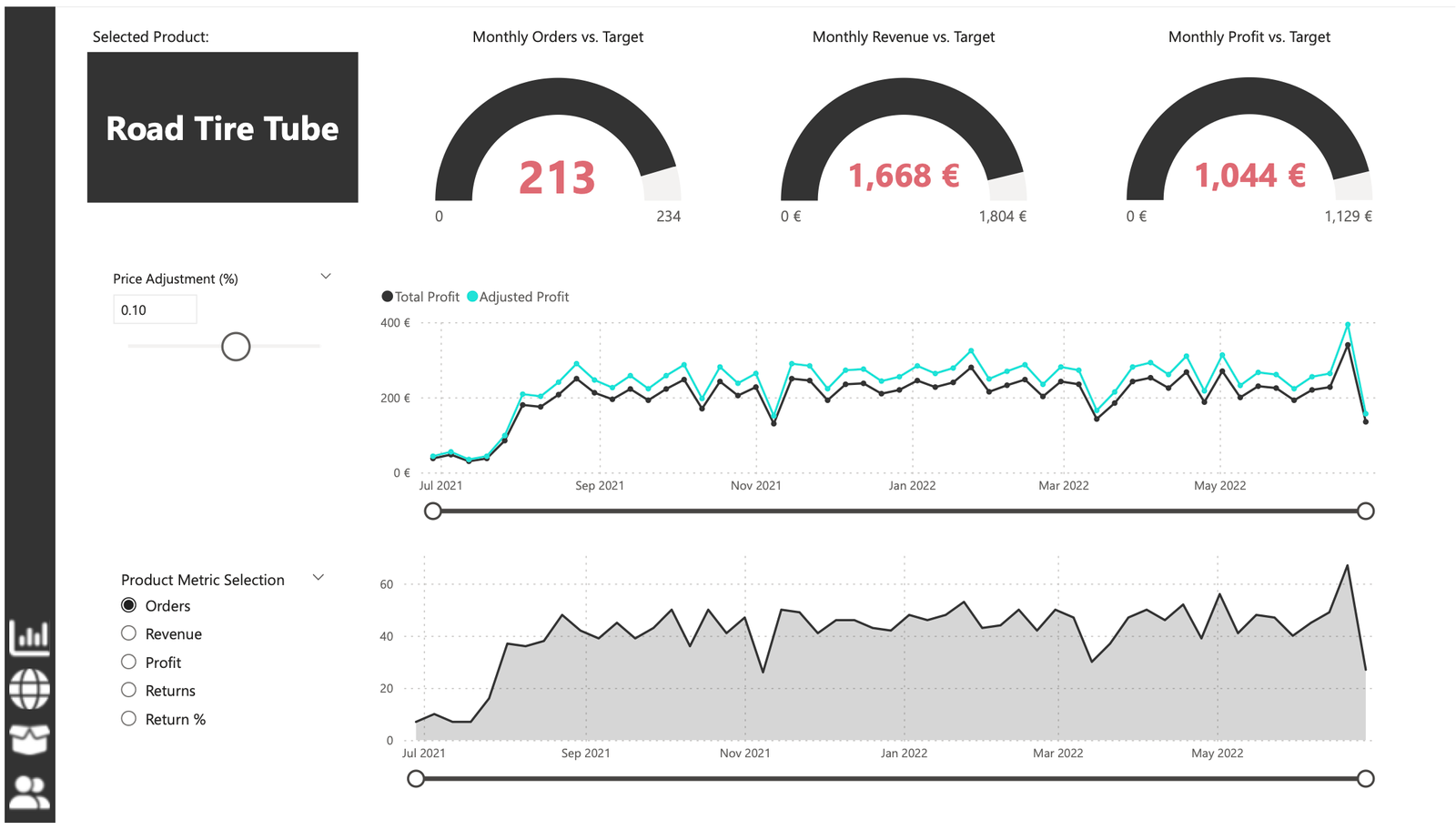
Product Detail: The third report page focuses on detailed product-level analysis. It displayed detailed product information for the selected top 10 products from the Executive Dashboard, using the drill-through feature. It also included gauge charts presenting actual performance vs target performance of monthly orders, revenue, and profit, and included an interactive line chart to visualize potential profit adjustments when manipulating the price of the product, aiding in strategic decision-making regarding pricing strategies. This report page also included a line chart including key weekly product information on total orders, revenue, profit, returns, and return rate.

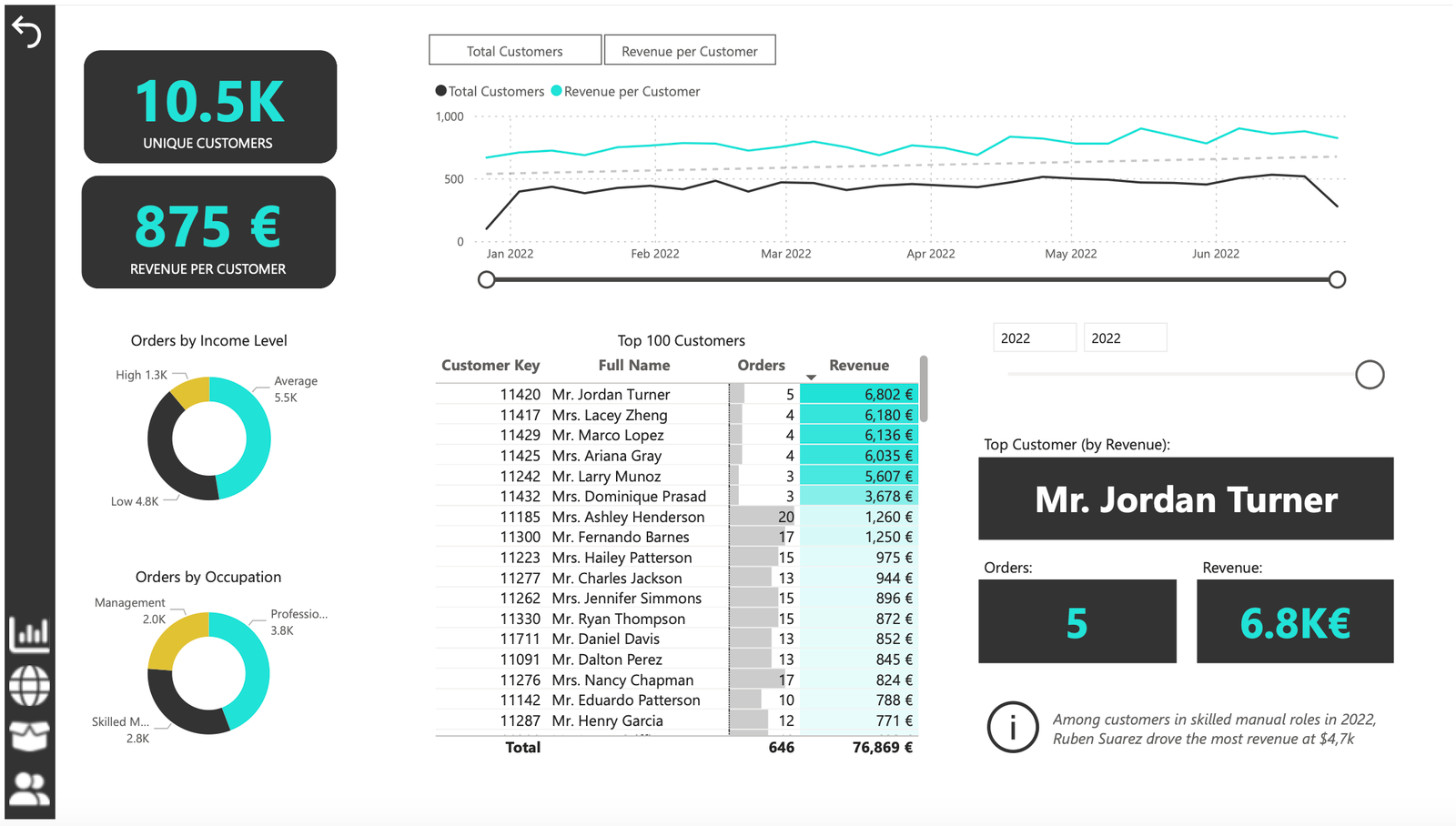
Customer Detail: The fourth and final report page provided a deeper insight into customer behavior and value. It used donut charts to break down customer groups into income level and occupation categories vs. total orders, helping in customer segmentation tactics, and used a matrix aided by KPI cards to identify high-value customers based on order and revenue contributions, aiding in identifying high-value customers and sales opportunities.

Oodles of Noodle (Power BI)
The Situation:
Oodles of Noodles is meal kit delivery service company. Our task is to derive meaningful insights into retail operations and customer behavior.
- Track KPIs (Revenue, Number of Shipments, Number of meal kits, avg review by customers, Active Customer Revenue , Active Customer Reviews, NO.1 Region by Sales, No.1 Customer by Sales , total Reviews).
- Region level Analysis which shows us the total shipments by each region, total meal kits sold in each region, Reviews by each region , Revenue trend by Regions, Also include the countries performance .
- Customer behavior Analysis which show us the customer trend by dates, Customer by each country, Subscription plan analysis , meal kit analysis .
The Data:
We have been given a collection of raw data (CSV Files) which contain information about Meal kit sold From 2020 to 2023.
The Task : We tasked with solely Microsoft Power Bi to:
- Connect and transform the data in Power Bi’s Back-end Power Query.
- Build a relational model, linking the fact and dimension table.
- Create calculated columns and measures with Dax.
- Design a multi-page interactive dashboard to visualize the data in Power BI’s Front end.
The Process:
1. Connecting and Shaping the Data
Firstly, we imported the data into the Power Query editor to transform and clean it. The next process involved:
Removing Duplicates: Duplicate entries were removed from the dataset to ensure accurate analysis.
Handling Null or Missing Values: For some columns, missing values were replaced with defaults or averages. Null values in “key” columns were removed using filters.
Data Type Conversion: Columns were converted to appropriate data types to ensure consistency. Dates were converted to Date type, numerical columns to Decimal or Whole Numbers, and text columns to Text.
Column Splitting and Merging: Several columns were split to separate concatenated information, or merged to create a unified name (such as Customer Full Name).
Standardising Date Formats: All date columns were formatted consistently to facilitate time-based analysis. This step was important for ensuring accurate time-series analysis in Power BI.
Removing Unnecessary Columns: Irrelevant columns were removed to streamline the dataset. This helped focus the analysis on relevant information, reducing memory usage and improving performance.
2. Building a Relational Data Model
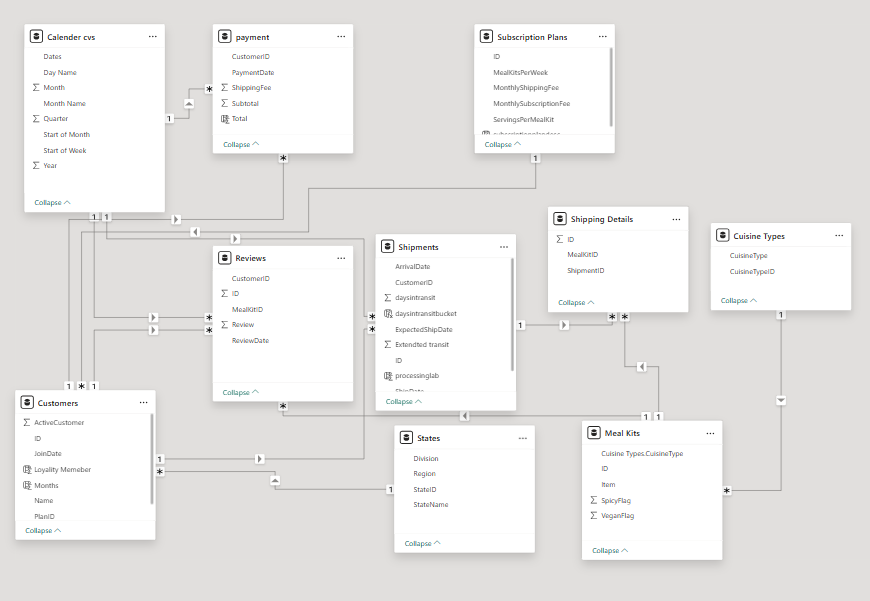
Secondly, we modeled the data to create a snowflake schema. This process involved creating relationships between the dimension and fact tables, ensuring cardinalities were one-to-many relationships.

3. Creating Calculated Columns and Measures
Next, we used Power BI’s front-end formula language, DAX, to analyze our relational data model and create several calculated columns (for filtering) and measures (for aggregation), that we could later reference and use when analyzing and visualizing the data.
We used calculated columns to determine whether a customer is a parent (Yes/No), a customer’s income level (Very High/High/Average/Low), a customer’s priority status (Priority/ Standard), and the customer’s educational level (High School/ Undergrad/ Graduate).
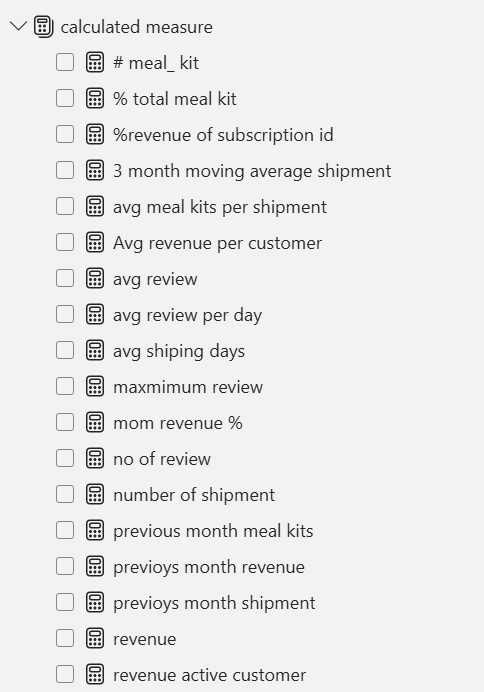
The list of calculated measures is available below and includes key information on revenue, profit, orders, returns, and more.

4. Visualising the Data
The final step of the project was creating a multi-page interactive dashboard, including a range of visuals and KPIs that could serve management and lead to informed decision-making. We used several visuals and tools to demonstrate and visualize the data across the 4 report pages, including KPI cards, line and bar charts, matrices, gauge charts, maps, donut charts, and slicers. We made sure the report was fully interactive and simple to navigate, with icons used to enable filters, cancel filters, and guide users to each report page with ease. Features such as drill-through, bookmarks, parameters, and tooltips were also used throughout the dashboard, further enhancing its usefulness and impact on management.
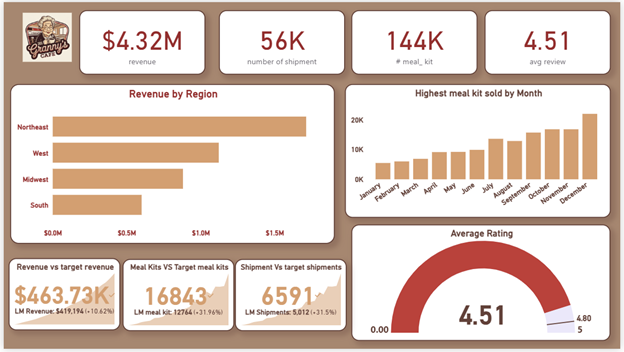
Executive Dashboard: Ths first report provides a high-level view of Oodles of noodles overall performance. We used Card Visuals to present key Performance indicators such as Total Revenue, Number of Meal kits, Total shipments, Average review. We also included a bar chart to show revenue by each region, a bar chart to show meal kit sold in each month, a gauge chart to show the reviews and target review and KPI cards to show this year and last year sale caparison in percentage.

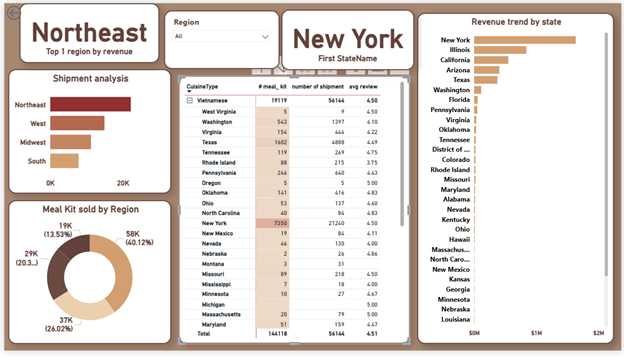
Region Level analysis: In Region Analysis , basically first l found the Number 1 region by meal kits sold, number shipments by each region, meal kits sold by each region, state revenue trend, and cusinie type performance in each cities by analyzing meal kits sold, number of shipment, avg review.

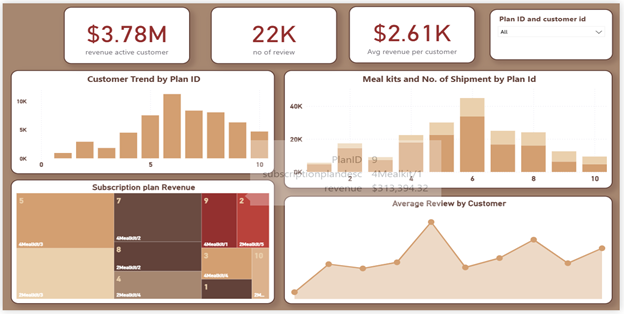
Customer &Subscriptionplan analysis: In this segment, I analyzed the Active customer revenue , avg review by customers and total review .i show them by KPI cards. I also analyzed the Customer trend by plan ID using bar chart. I also used a Tree map to show subscription plan performance .i create a line chart of avg review by customer to check the reviews by each customers. i used a stack bar chart to analyze the meal kits and no of shipments by plan ID.

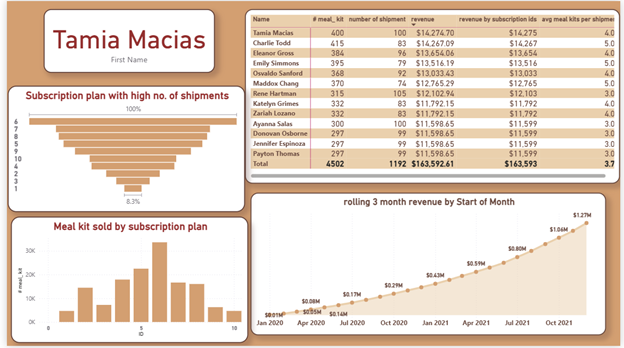
SubscriptionplanOverview: Top !0 customers by Revenue who purchased highest meal kits etc shows in matrix visual. I created a KPI card to show the top 1 customer who has the highest role in revenue .i used atimr intelligence functions to calculate the 2 months rolling revenue for this I used a line chart and I shaded the area for better visual and I added marker points to show the high and low breakouts. I used a funnel chart to visualize the subscription plan highest by shipments. I used a bar chart to see the Meal kits sold by each Subscription plan.

365 Cosmetics (Power BI)
The Situation:
365 Cosmetics is a beauty Product brand which sells product of different categories include (face care, body care, home accessories ,Makeup , Hair care).
Our Task is to do :
- Product Performance Analysis
- Market Trend Analysis
- Current Period Vs last Period Analysis
- Customer Level Analysis
- Region level performance Analysis
- Customer’s Trend Analysis
The Data:
We have been given a Raw dataset (CSV Files) which contains information about Sales from Year 2020 to 2023.
The Task : We tasked with solely Microsoft Power Bi to:
- Connect and transform the data in Power Bi’s Back-end Power Query.
- Build a relational model, linking the fact and dimension table.
- Create calculated columns and measures with Dax.
- Design a multi-page interactive dashboard to visualize the data in Power BI’s Front end.
The Process:
1. Connecting and Shaping the Data
Firstly, we imported the data into the Power Query editor to transform and clean it. The next process involved:
Removing Duplicates: Duplicate entries were removed from the dataset to ensure accurate analysis.
Handling Null or Missing Values: For some columns, missing values were replaced with defaults or averages. Null values in “key” columns were removed using filters.
Data Type Conversion: Columns were converted to appropriate data types to ensure consistency. Dates were converted to Date type, numerical columns to Decimal or Whole Numbers, and text columns to Text.
Column Splitting and Merging: Several columns were split to separate concatenated information, or merged to create a unified name (such as Customer Full Name).
Standardising Date Formats: All date columns were formatted consistently to facilitate time-based analysis. This step was important for ensuring accurate time-series analysis in Power BI.
Removing Unnecessary Columns: Irrelevant columns were removed to streamline the dataset. This helped focus the analysis on relevant information, reducing memory usage and improving performance.
2. Building a Relational Data Model
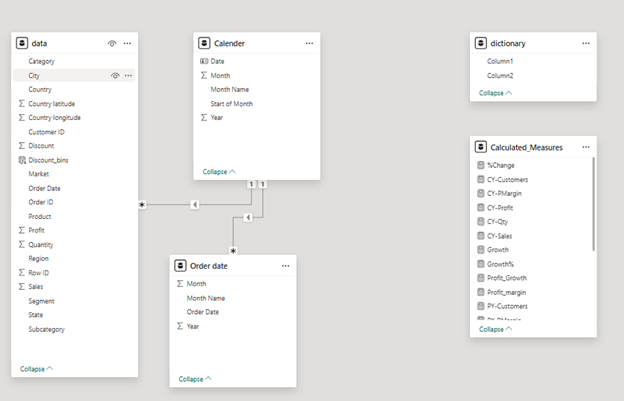
Secondly we modified the data to create a Galaxy schema. This Process involved creating relationship between the dimension and fact tables, ensuring cardinalities were one-to many relationship.

3. Creating Calculated Columns and Measures
Next, we used Power BI’s front-end formula language, DAX, to analyze our relational data model and create several calculated columns (for filtering) and measures (for aggregation), that we could later reference and use when analyzing and visualizing the data.
The calculated columns created are Total Sales, total profit, total cost, total customers , total orders to give info about the Major points and achievements. The comparison of this year sales vs last year sales, this year profit vs last year profit, this year orders vs last year orders. Subtract this year with last year number will give us growth of Revenue, profit, cost, customers, orders in Percentage%.
The list of calculated measures is available below and includes key information on revenue, profit, orders, returns, and more.

4. Visualising the Data
The final step of the project was creating a multi-page interactive dashboard, including a range of visuals and KPIs that could serve management and lead to informed decision-making. We used several visuals and tools to demonstrate and visualize the data across the 5 report pages, including KPI cards, line and bar charts, matrices, gauge charts, maps, donut charts, and slicers. We made sure the report was fully interactive and simple to navigate, with icons used to enable filters, cancel filters, and guide users to each report page with ease. Features such as drill-through, bookmarks, parameters, and tooltips were also used throughout the dashboard, further enhancing its usefulness and impact on management.
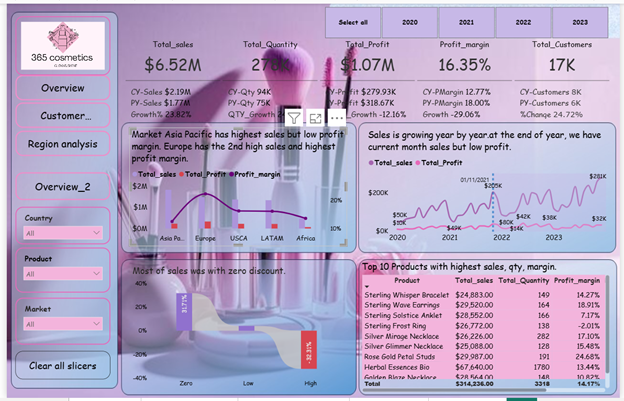
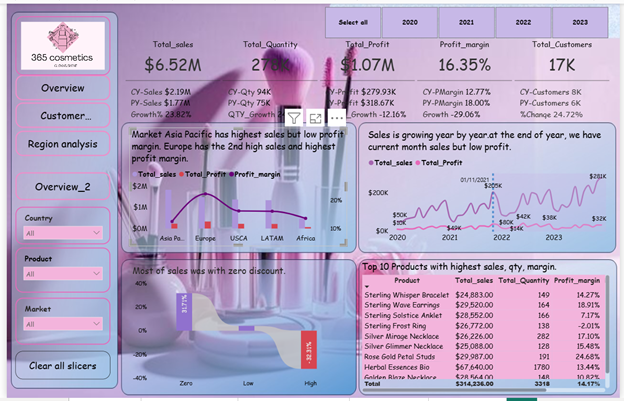
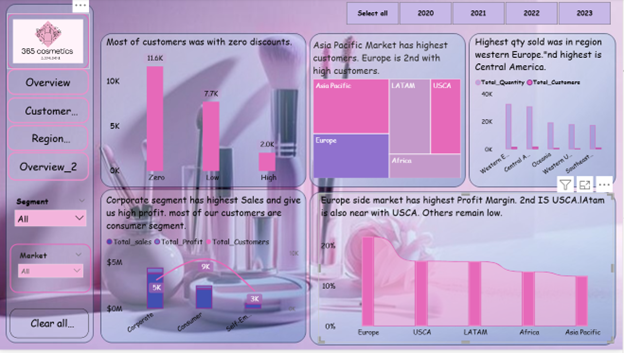
Executive Dashboard: The first page of report give the overall performance view .We used card visuals to show the KPI like revenue ,Quantity, Profit margin, Profits, Customers. We use new card visuals to compare number of this year vs last year with growth in per%. Next we analyzed market analysis using a line and cluster column chart .Then I create a line chart to analyzed the Sales and profit trend . We used a matrix visual to show the performance of top 10 products. The variation of customers in discount bins. Some of the customers did not take the Discounts .You can see the visual picture :

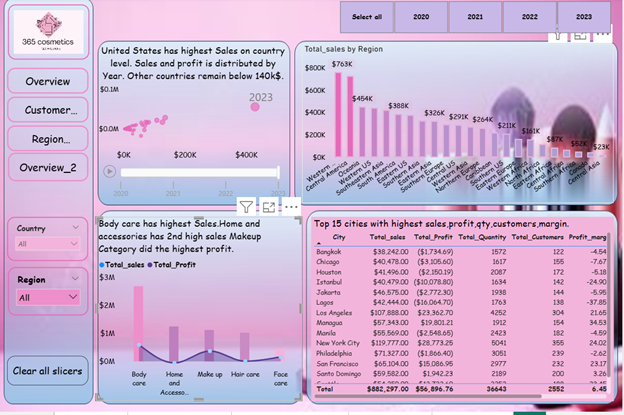
Region Level analysis:First , We analyzed the top country performance using a scatter chart which shows by a bubble which country has highest volume in sales. Then, We analyze the Region level performance by a column chart . we use a Line and clustered column chart to see Category performance .Then a matrix visual to see top 10 cities by sales,

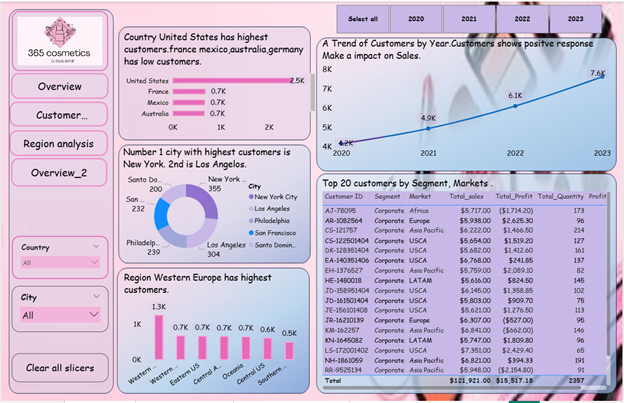
Customer analysis: In customer analysis, We first analyzed the performance of customers by Country, City and Region . A line chart to see the time trend of customers which is increasing month by month. A matrix visual to see the top 20 customers by Market, and segment.

Overview: In last page, We use a column chart to see how many of the customers was with zero discounts and with discount.. We use a tree map to see the market with highest customers. We also focus on a region level quantity analysis. In segment analysis, analyzed the total sales, customers , profit by each segment. further analyzed the profit margin by each Segment .

Bookmark Page : A bookmark page to see a specific country Pakistan sales which city has high sales, quantity sold , margin .one is for cities analysis and one is for overall main overview.Press one button and a new screen appear as a new information of Pakistan cities.

My Resume
Experience Background
Sales and Marketing Manager
Nisolo Company, California, United States (10th Jun, 2021 – 10th Jun, 2023)As a Social Media Marketing Describer at Nisolo, my role involves crafting engaging product descriptions, writing compelling captions for Instagram, Facebook, TikTok, And Running Ads also generate Conversation
Education Background
Associate Degree in Computer Science
Khawaja Fareed University of Engineering and Technology (2025)CGPA: 3.41/4
Soft Skill
Leadership & Strategic Planning
Training and Development
Teamwork and Coordination
Recruiting & Onboarding
Communication & Presentation
Technical Skill
STATISTICS
MICROSOFT EXCEL
POWER BI
STRUCTURED QUERY LANGUAGE SQL
PYTHON
Certifications
Professional Data Analyst Certification Program
Analytix Camp (Aug 2025 – Jan 2026)
1. Proficient in Excel: Demonstrated ability to manipulate data, perform complex calculations, create pivot tables, and generate insightful visual.
2. Power BI Specialization: Capable of designing interactive dashboards and reports to visualize data trends and patterns, enabling stakeholders to make informed business decisions..
3. Proficient in SQL: Profound understanding of SQL querying language, adept at extracting and manipulating data from relational databases to conduct thorough data analysis and generate meaningful insights.
4. Strong foundation in Statistics: Possess a solid grasp of statistical concepts such as hypothesis testing, regression analysis, and probability theory, enabling accurate interpretation of data and formulation of data-driven recommendations.
5. Competent in Python: Proficient in utilizing Python programming language for data manipulation, analysis, and visualization tasks, leveraging libraries such as Pandas, NumPy, and Matplotlib to derive actionable insights from diverse datasets.
6. Comprehensive understanding of Data Analysis Methodologies: Equipped with a holistic understanding of various data analysis techniques and methodologies, including exploratory data analysis (EDA), and regression analysis, to extract actionable insights and drive business growth.
7. Effective Communication and Presentation Skills: Able to effectively communicate complex analytical findings to diverse stakeholders through clear and concise reports, presentations, and visualizations, facilitating informed decision-making processes across organizational levels.
Verification Link: Ahad Raza Certification - Analytix Camp
Testimonial
Muhammad Abbas
Chief Executive OfficerData Analytics Project Development
via Fiverr - Aug, 2025 - Jan, 2026I am pleased to commend Ahad Raza for his outstanding dedication, consistency, and unwavering commitment to excellence. He demonstrates a strong work ethic, sharp intellectual curiosity, and a sincere passion for learning, all of which contribute positively to our academic environment. Ahad approaches challenges with confidence and resilience, always striving to perform at his highest level while maintaining a respectful and collaborative attitude. His ability to balance academic achievement with teamwork and growing leadership qualities makes him a valued and respected member of our community. Ahad’s accomplishments and positive attitude continue to inspire his peers and clearly reflect his strong potential for future success.